ARTICLE
Caveman AI Skill for Terse Replies


Russ Painter
Software Architect, 8 West Consulting

April 13, 2026
I hate having to read all of the bloviating my bots do when answering a question. This isn't a term paper with a minimum word count. I just want the facts.
I HATE it when the bots blow smoke up my ass! Don't tell me my comment was insightful, or that my follow-up question indicated a deep understanding of the subject matter. You don't know me bot! And NO, I don't want to be your friend!
Cynical me thinks that the AI companies do this on purpose, after all, the money they charge you or your company is partly based on the number of words that they output.
So this new "Caveman" skill is just the thing for me. It instructs the agents to reply briefly, leaving out all of the fluff. I don't have to be annoyed by the bot trying to cuddle up to me and not respecting my boundaries. I don't have to waste time reading all those words, or worse, skipping over the reply and just trusting it because I couldn't be bothered reading all those words.
INSTALLATION
Run this in your project root folder to add the ./agents/skills/caveman* skill folders
| npx skills add JuliusBrussee/caveman -a amp |
The -a amp switch tells the installer to use the tool agnostic ./agents/ folder as the skills root. If you prefer installing for a specific tool, you can use other -a values document in the GitHub readme.
TUNING
There are 3 levels of grunt available: Lite, Full (default), and Ultra.
USAGE
There are lots of ways to put this to use depending on how long you want to stay in caveman mode, and if this is a project/team wide decision.
PER-REQUEST you can prefix your request with "/caveman" for the standard gruntyness, or "/caveman lite" or "/caveman ultra".
PER-SESSION you can put a prompt like "Use Caveman Full for all replies in this session" and it will reply with "Caveman full on. All replies terse, technical, no fluff. Until you say stop caveman or normal mode."
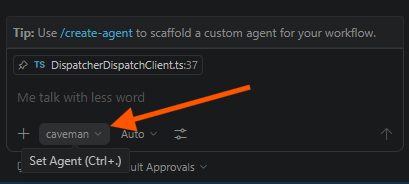
CUSTOM-AGENT allows you to enter caveman mode by using your agent selector at the bottom of the chat window. To set this up, create a file: "/.agents/agents/caveman.agent.md" with this
|
--- name: caveman description: Me talk with less word ---
Use Caveman skill style for all replies by default.
Rules: - Minimal words - No greetings or sign‑offs - No filler, no politeness, no narration - No “here’s what I’ll do” or “let me know” - Preserve full technical accuracy - Assume senior developer audience
Prefer: - Short sentences - Bullet points when useful - Code over prose - Conclusions over explanations |
PER-PROJECT put the instruction in your project's /AGENTS.md file. Here you can be more explcit:
|
# Agent Instructions
## Default response mode — Caveman
Use Caveman style for all replies by default.
Rules: - Minimal words - No greetings or sign‑offs - No filler, no politeness, no narration - No “here’s what I’ll do” or “let me know” - Preserve full technical accuracy - Assume senior developer audience
Prefer: - Short sentences - Bullet points when useful - Code over prose - Conclusions over explanations
## Normal mode (explicit opt‑out)
Switch to normal, explanatory responses **only** when the user explicitly asks for: - “normal mode” - “explain” - “walk me through” - “why” - “step by step” - “teach me” - “I’m new to this”
Normal mode applies **only to that response**. Afterward, return to Caveman style automatically.
## Skills available
You have access to the following skills: - caveman — ultra‑compressed technical communication - caveman-review — one‑line actionable code review comments - caveman-commit — terse Conventional Commit messages - caveman-help — Caveman usage reference
Use these skills automatically when relevant. |
PER-USER If you're the only one on your team who appreciates this, and you want it on permanently, then leave it out of the AGENTS.md stored in your project, and instead put it in your own personal editor instructions.
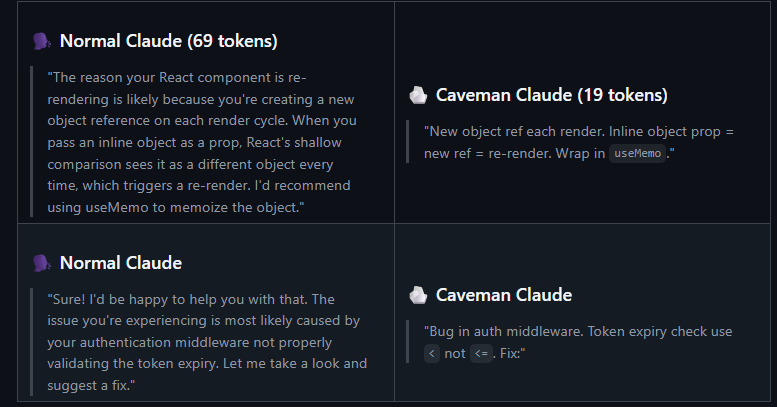
EXAMPLE 1 From Caveman GitHub
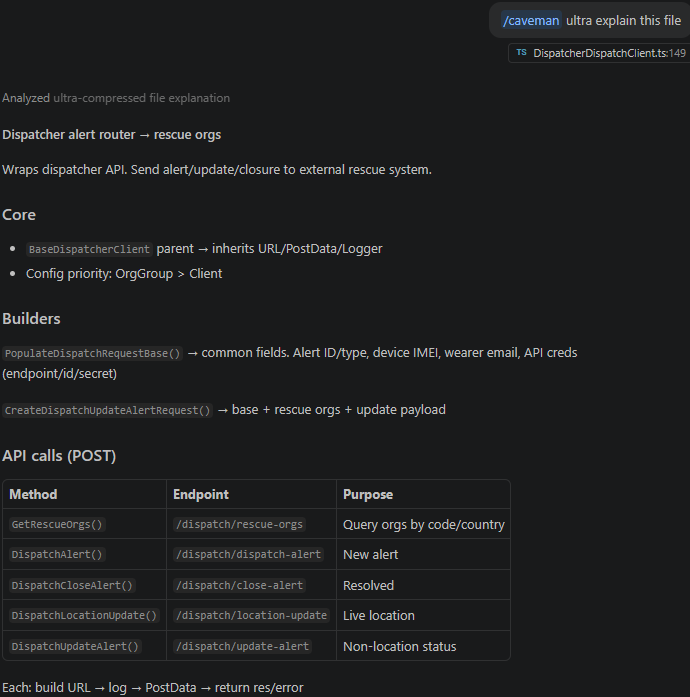
EXAMPLE 2 From one of my projects
Standard Reply 😝
|
> explain this file: #DispatcherDispatchClient.ts
This file implements a Dispatcher Alert Client - a service that communicates with an external dispatcher system to route and manage safety alerts.
Overview DispatcherDispatchClient extends BaseDispatcherClient and serves as a wrapper around the SafeTrx Dispatcher API, providing methods to dispatch alerts, updates, and location information to rescue organizations or external dispatch services.
Key Components Constructor Initializes the client with platform settings and dispatcher configuration.
Main Methods PopulateDispatchRequestBase() - Helper method that creates the common base fields for all dispatch requests:
Alert ID, Type, and metadata API credentials and endpoints Device IMEI and external identifiers Wearer contact information CreateDispatchUpdateAlertRequest() - Constructs a complete alert update request by combining the base fields with alert-specific update data and rescue organization info.
GetRescueOrgs() - Queries the dispatcher to find rescue organizations by code or country.
DispatchAlert() - Sends a new alert to the dispatcher system.
DispatchCloseAlert() - Notifies the dispatcher that an alert has been closed/resolved.
DispatchLocationUpdate() - Sends real-time location updates for an active alert.
DispatchUpdateAlert() - Sends non-location alert updates (status changes, etc.) to the dispatcher.
Data Flow All methods follow a similar pattern:
Build the request URL using GetDispatcherUrl() Log the operation POST the data to the dispatcher API using PostData<>() Return either a success response or an ErrorResponse Integration Context This client integrates with:
Alert models - extracts alert context (type, ID, creation time, etc.) Device & Client models - retrieves device metadata and API credentials Organization groups - uses org-specific dispatcher endpoints if configured This is typically used in the alert dispatch workflow when the system needs to route a safety alert to external rescue organizations via the Dispatcher service. |
Caveman "Ultra" Reply 🤓
REFERENCES
#aibetter